
Almost everyone has experienced a computer that suddenly becomes slow. Programs take forever to open, Windows freezes, and even simple tasks become frustrating. Fortunately, many slow computers can be fixed without buying a new one.
1. Too Many Startup Programs
Many applications automatically launch every time Windows starts. Over time these programs consume memory and processor resources, making your computer feel sluggish.
Open Task Manager → Startup Apps and disable anything you don't need launching automatically.
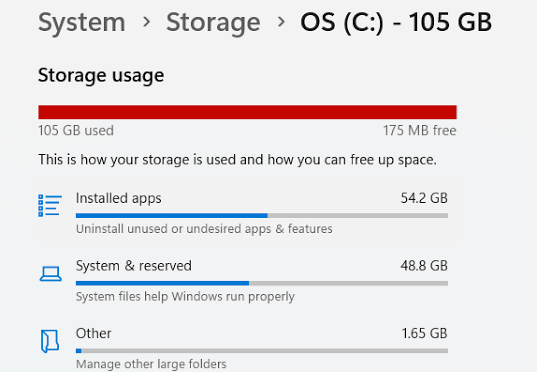
2. Your Hard Drive Is Nearly Full
Windows needs free storage space to create temporary files. When a drive fills up, overall performance suffers.
3. Malware or Viruses
Malicious software often runs quietly in the background while using your computer's resources.
Things You Can Try Today
- Restart your computer
- Install Windows updates
- Remove unused software
- Run a virus scan
- Free up storage space
- Disable unnecessary startup apps
Frequently Asked Questions
Can a computer be too old?
Yes. Older hardware may not meet the requirements of modern software.
Will adding RAM make my computer faster?
If your computer frequently runs out of memory, adding RAM can noticeably improve performance.
Can a virus slow down my computer?
Yes. Malware and viruses often run in the background using your computer's processor, memory, or internet connection. Running a trusted antivirus scan can help detect and remove malicious software.
Is it worth repairing an old computer?
In many cases, yes. Replacing a traditional hard drive with an SSD or adding more RAM can significantly improve performance and extend the life of an older computer.
When Should You Call a Professional?
If your computer is still running slowly after removing startup programs, installing updates, freeing storage space, and scanning for malware, the issue could be caused by failing hardware, overheating, or a damaged Windows installation.
A professional diagnostic can identify the root cause and determine whether your computer needs a computer repair, an SSD upgrade, additional RAM, or simply software optimization.
Get Professional Help